

Your iPad Games Aren’t Really Teaching—Here’s What Works Instead
iPad educational games promise engaging learning experiences, but they often fall short in real classroom settings. Individual devices mean students work in isolation rather than collaborating. Managing 25+ iPads becomes a tech nightmare when half the class can’t log in or the Wi-Fi crashes. Games lock you into preset content that doesn’t match your curriculum or student needs. Plus, screen time concerns and device access limitations leave some learners behind.
There’s a better solution that delivers the engagement you want without the headaches. PowerPoint-based educational games transform your classroom into an interactive learning hub where everyone participates together. Project these customizable templates onto your screen and watch your whole class get excited about learning. You control the content, adapting every question to match exactly what your students need to practice. No app downloads, no individual logins, no expensive subscriptions.
These interactive templates work on any device you already have, creating that game-show excitement that motivates even reluctant learners. Customize difficulty levels, add your own images, and switch topics in minutes. Your students stay engaged through whole-class collaboration, friendly competition, and instant feedback—all while you maintain complete control of the learning experience.
Why Most iPad Educational Games Fall Short in the Classroom

The Device Management Headache
Let’s be honest—managing iPads in the classroom can feel like a part-time job you didn’t sign up for! Between keeping devices charged, wrestling with software updates at the worst possible moments, and distributing tablets to eager students, you’re losing precious teaching time. Then there’s the inevitable troubleshooting: forgotten passwords, apps that won’t launch, connectivity issues, and that one iPad that mysteriously stops working right before your lesson. You might find yourself playing tech support instead of teacher, which isn’t what you envisioned when you planned that exciting game-based lesson. These behind-the-scenes challenges add up quickly, turning what should be a smooth learning experience into a logistics puzzle that can leave you wondering if there’s a simpler way to bring interactive games into your classroom.
When Solo Screen Time Replaces Team Learning
Picture this: twenty students hunched over their individual iPads, completely absorbed in their own digital worlds. While they might be learning, they’re missing something crucial—each other! iPad games often create silent classrooms where collaboration takes a backseat to solo play.
Your classroom thrives on energy, discussion, and teamwork. When students work together, they develop communication skills, learn to share ideas, and build confidence. iPad games, even the educational ones, typically focus on individual progress and achievements. Students can’t bounce ideas off each other or celebrate wins as a group.
This is where whole-class activities shine. Consider using alternatives to Kahoot that encourage students to work in teams or participate together. PowerPoint-based games displayed on your classroom screen naturally foster discussion and collaborative problem-solving. Students can strategize together, cheer for classmates, and build that sense of community that makes learning memorable and fun!
The Equity Gap Nobody Talks About
Here’s the reality: while iPad educational games sound amazing in theory, not every student has access to a device. Many classrooms operate with shared iPads or limited technology budgets, creating a two-tier learning experience where some students engage digitally while others wait their turn or miss out entirely. This equity gap means that relying heavily on individual device-based games can actually widen achievement differences rather than close them. The good news? You can create engaging, tech-enhanced learning experiences that work for your entire class at once. Using tools like interactive PowerPoint games displayed on your classroom screen ensures every student participates simultaneously, regardless of device availability. This whole-class approach transforms your teaching from managing individual screen time to facilitating collaborative learning that includes everyone equally.
What Makes a Better Educational Game Alternative
So what should you look for when choosing alternatives to individual iPad games? The best educational game alternatives share a few game-changing features that transform how your entire classroom learns together.
First and foremost, look for whole-class engagement. Instead of students working individually on devices, everyone participates at the same time. This creates an energetic, collaborative atmosphere where students feed off each other’s excitement and learn together. You’ll notice the difference immediately—no more quiet isolation, but rather a buzzing classroom full of active learners.
Easy setup is another must-have. You shouldn’t need to spend your prep time downloading apps, troubleshooting devices, or dealing with technical headaches. The best alternatives let you jump right into teaching with minimal preparation. Think plug-and-play solutions that work with the technology you already have.
Customization is where things get really exciting. Generic games with pre-made content can’t address your specific lesson plans or adapt to your students’ unique needs. Look for tools that let you create activities for any subject, any topic, and any grade level. Whether you’re teaching fractions, vocabulary, historical events, or science concepts, you should be able to customize the content to perfectly match what your students need to learn that day.
Finally, teacher control matters tremendously. You need to control the pacing, decide when to pause for discussion, and adjust difficulty on the fly. The best alternatives put you firmly in the driver’s seat, allowing you to respond to your students’ understanding in real-time rather than letting an algorithm make those decisions for you.
PowerPoint Game Templates: The iPad Alternative Your Classroom Actually Needs
Built for Whole-Class Energy
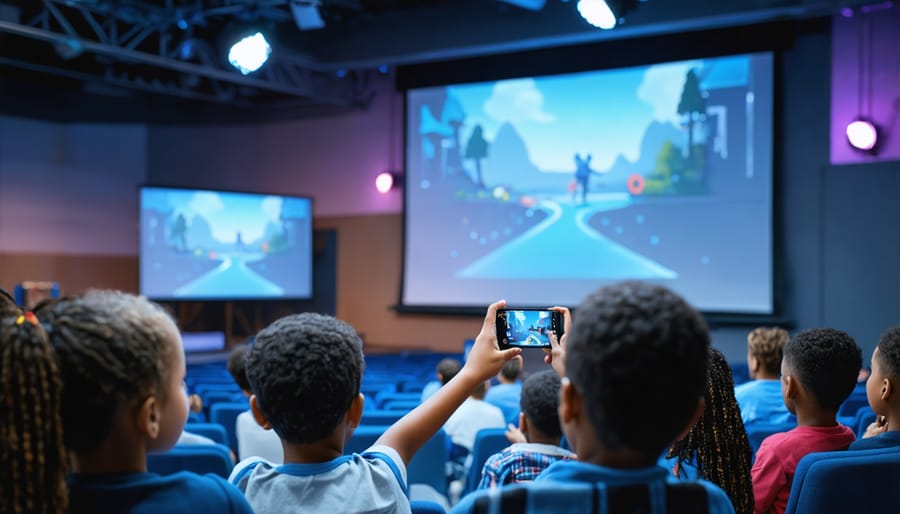
PowerPoint games transform your classroom into an energetic learning space where everyone participates together. Unlike individual iPad games that isolate students, team-based review games displayed on your classroom screen create natural excitement and friendly competition. Students cheer for their teams, collaborate on answers, and stay engaged as a community. You’ll love watching quiet students come alive during whole-class game time, and the collective energy keeps motivation high throughout the activity. Plus, you control the pace and can pause to explain concepts when needed. This shared experience builds classroom culture while reinforcing important content, making review time something students actually look forward to instead of another solo screen activity.
Customize Once, Use Forever
Here’s the beauty of using templates instead of rigid apps: you create your game once, then adapt it endlessly for any subject or grade level. Need to practice multiplication facts today and spelling words tomorrow? No problem! Want to use the same game format with your second graders and fifth graders? Simply swap out the content. Unlike iPad apps that lock you into specific topics or age ranges, customizable templates grow with your curriculum needs throughout the entire year. You’re not searching for new apps every unit or paying for multiple subscriptions. Design your perfect review game, save it, and transform it whenever your lesson plans change. This flexibility means less prep time hunting for the right tool and more time actually teaching.
Ready in Minutes, Not Hours
Here’s the best part: PowerPoint classroom games are incredibly quick to set up. Unlike iPad apps that require multiple downloads, account creation, and syncing across devices, you can have a game ready to play in just minutes. Simply download the template, add your own questions or content, and you’re ready to project it on your screen. No logins to remember, no Wi-Fi connectivity issues to troubleshoot, and no waiting for updates. This means less tech headache and more time actually teaching. You can customize games during your prep period and launch them instantly when class begins. It’s the kind of hassle-free solution that makes integrating fun learning activities feel effortless rather than overwhelming.
Built-In Features That Keep Students Hooked
Great educational games know how to keep students coming back for more, and the best part is you can build these same addictive features into your classroom activities! Think animated scoreboards that flash and celebrate wins, satisfying sound effects that reward correct answers, and progress bars that show students climbing to the next level. You can create team competitions with visual leaderboards displayed on your smartboard, design point systems that unlock special privileges, or add countdown timers that build exciting urgency. The secret is making learning feel like playing their favorite games. When you incorporate these game mechanics into your lessons using customizable templates, you’re tapping into the same psychological rewards that make popular iPad games so engaging. Students stay motivated because they can see their progress, compete in friendly challenges, and experience instant feedback. The difference? You control the content, making sure it perfectly matches your learning objectives while keeping that irresistible game-like energy alive in your classroom.
Other Hands-On Alternatives That Beat Screen Time
While digital tools have their place, sometimes the best learning happens when students can touch, move, and manipulate real objects. Physical games and materials offer unique benefits that screens just can’t replicate.
Board games designed for learning bring students together face-to-face, encouraging communication and social skills alongside academic content. Games like Sum Swamp for math practice or Bananagrams for spelling keep kids engaged while building critical thinking skills. The tactile experience of moving game pieces and handling cards creates memorable learning moments that stick with students long after the lesson ends.
Card games offer quick, flexible activities you can pull out anytime. Whether you’re reinforcing multiplication facts, vocabulary words, or science concepts, a deck of cards gives students hands-on practice without setup hassles or tech troubleshooting. You can easily customize traditional card games to match your curriculum, and students love the competitive yet collaborative atmosphere they create.
Math manipulatives like base-ten blocks, fraction tiles, and pattern blocks transform abstract concepts into concrete understanding. When students can physically build numbers or create geometric shapes, those aha moments happen naturally. These tools work beautifully for differentiation too, since you can use the same materials across multiple grade levels with different complexity.
The beauty of these alternatives is their simplicity. No charging required, no app updates, and no screen fatigue. Plus, they encourage movement and peer interaction, which research shows enhances retention and engagement. Consider rotating between digital and hands-on activities to give your students the best of both worlds while keeping learning fresh and exciting.

Making the Switch: Practical Tips for Teachers
Start Small with One Subject
You don’t need to overhaul your entire teaching approach overnight! Start by choosing just one subject or class period where you’d like to try incorporating review games. Maybe it’s that Friday afternoon math class that needs an energy boost, or your social studies unit that could use a more interactive wrap-up. Pick a topic you’re already comfortable with so you can focus on learning the game mechanics rather than juggling new content at the same time.
Beginning with a single subject lets you test the waters, see what works with your students, and build your confidence without feeling overwhelmed. You’ll quickly discover what game formats your class responds to best and learn the rhythm of making review sessions engaging. Once you’ve found your groove and seen those excited faces during game time, expanding to other subjects becomes natural and exciting rather than daunting.
Get Students Excited About the Change
The key to a smooth transition is getting your students genuinely excited about trying something new! Frame this as a special upgrade rather than a downgrade. Tell them they’re going to play games together as a team, where everyone can participate at the same time instead of taking turns. Emphasize the fun factor by saying things like, “We’re going to try some super interactive games where you can all play together!” You can even let students help customize game elements like team names or themes, giving them ownership of the experience. Make it clear this isn’t about taking away technology, but about adding a new way to learn that’s more inclusive and energetic. When students see their classmates getting involved and having fun together, the enthusiasm becomes contagious. Consider building anticipation by previewing an upcoming game day or letting them vote on which game to try first.
Balance Digital and Interactive Learning
iPads work wonderfully for individual practice and skill reinforcement, especially during centers or independent work time. They’re perfect for students who need extra support or those ready for enrichment challenges. However, when you want whole-class engagement and lively discussion, hands-on activities and interactive PowerPoint games often create better learning outcomes. The key is knowing when to use each tool strategically. Save iPads for moments when personalized pacing matters most, but choose collaborative games and physical activities when building community and encouraging peer interaction. Think of your iPad games as one tool in your teaching toolkit rather than the only solution. Mix digital options with creative alternatives like customizable templates, board games, and group challenges. This balanced approach keeps students excited about learning while giving you the flexibility to adapt to different lesson objectives and classroom dynamics.
At the end of the day, the best educational games aren’t necessarily the ones that happen on a screen. What truly transforms your classroom is interaction, engagement, and that unmistakable energy when every student is participating together. While iPad games have their place, they often fall short when it comes to building the collaborative, whole-class experience you’re working so hard to create.
The good news? You have incredible alternatives right at your fingertips. Interactive PowerPoint games, printable activities, and hands-on learning tools can deliver everything you love about digital engagement while solving those frustrating limitations you’ve been dealing with. They’re customizable to fit your specific students, easy to adapt on the fly, and designed to get everyone involved at once.
So if you’ve been searching for something that sparks genuine excitement and delivers real learning outcomes, it might be time to step away from individual screens and try approaches that bring your whole class together. Your students will thank you for it, and you’ll love the results.