

Why Your Students’ Tech Skills Aren’t What You Think (And How to Really Measure Them)
Observe students during everyday classroom activities to spot digital literacy in action—watch how they navigate research tasks, evaluate online sources, and communicate through digital tools. You’re already seeing these skills unfold when students collaborate on shared documents, troubleshoot tech hiccups independently, or question the credibility of information they find online.
Create simple checklists that capture these real moments rather than adding formal tests to your plate. Note when learners can organize digital files effectively, adjust privacy settings, or cite sources properly. These quick observations during regular lessons reveal far more than standalone assessments ever could.
Transform your existing review sessions into opportunities for assessment by incorporating interactive activities where students demonstrate digital skills naturally. When they create content, share work digitally, or solve problems using technology, you’re gathering authentic evidence of their capabilities without extra prep time.
Turn your findings into targeted mini-lessons that address specific gaps. If students struggle with evaluating website reliability, spend ten minutes modeling your thought process. If they’re copying and pasting without understanding, demonstrate proper research techniques. Small, focused interventions based on what you observe create meaningful growth without overwhelming anyone—including you.
Digital literacy isn’t a separate subject to squeeze into packed schedules. It’s woven into how students learn every day, and assessing it should feel just as natural.
What Digital Literacy Actually Means in Your Classroom

Beyond Scrolling and Swiping
Here’s the truth: just because students can navigate TikTok like pros doesn’t mean they’re digitally literate. We often confuse familiarity with actual competence, and that’s where things get tricky in the classroom.
Digital literacy goes way beyond entertainment apps. It’s about finding reliable information online, evaluating sources critically, creating meaningful digital content, and collaborating effectively using technology. Your students might be scrolling experts, but can they tell a credible website from a sketchy one? Can they use digital tools to solve problems or express their learning creatively?
Think of it this way: knowing how to drive doesn’t make you a mechanic. Similarly, passive tech consumption doesn’t equal the active skills students need for academic success and future careers. Real digital competence shows up when students tackle research projects, organize information digitally, or troubleshoot tech hiccups independently.
The good news? You don’t need to be a tech wizard to assess these skills. By watching how students interact with technology during regular classroom activities, you’ll spot the difference between surface-level familiarity and genuine capability. That’s where meaningful assessment begins, and it’s totally manageable within your existing routine.
The Four Pillars Teachers Should Watch For
Think of digital literacy as four interconnected skills that students need to thrive in our tech-filled world. The good news? You’re probably already teaching these without realizing it!
First up is finding information. Can your students navigate search engines effectively? Do they know how to refine their searches when they get too many results? Watch for students who can quickly locate relevant information and those who struggle to move beyond the first page of results.
Next comes evaluating sources, which is absolutely crucial today. Students need to question what they read online. Look for learners who check multiple sources, notice website domains, and spot red flags like missing authors or sensational headlines. This skill helps them separate facts from fiction in a world full of both.
The third pillar is creating digital content. This goes beyond typing a document. Can students make presentations, edit images, or collaborate on shared files? Notice how they combine different tools to express their ideas. This is where creativity meets technology!
Finally, there’s staying safe online. Are students protecting their personal information? Do they understand privacy settings and recognize suspicious links? This foundation keeps them secure as they explore digital spaces.
The beauty of these four pillars is that they work together. When students research a topic, they’re finding information, evaluating it, creating something new, and hopefully doing it all safely. Assess them individually, but remember they’re strongest when combined!
Simple Ways to Assess Digital Literacy Without Adding Work to Your Plate
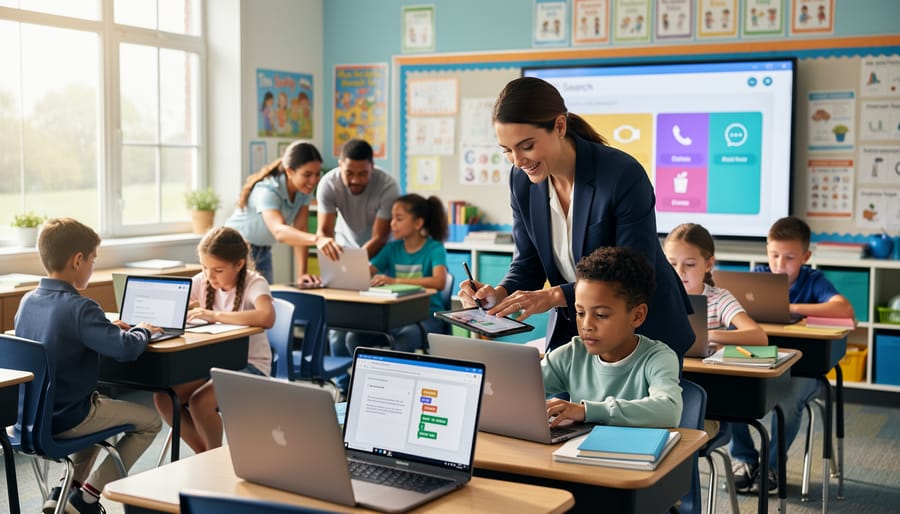
Watch and Learn: Observation-Based Assessment
Sometimes the best assessments happen when students don’t even realize they’re being evaluated! During everyday classroom activities, you can gather tons of insights about digital literacy just by paying attention.
Start by observing how students approach technology. Do they dive right in or hesitate? When working on collaborative projects, notice who troubleshoots issues independently versus who immediately asks for help. Watch how they navigate between tabs, save their work, or organize digital files. These small actions reveal comfort levels with basic tech skills.
Group work is especially telling. Who takes the lead when tech challenges arise? How do students communicate about digital tools with peers? You’ll spot natural problem-solvers and identify students who need more support in specific areas.
Create a simple observation checklist on your phone or tablet. Jot down quick notes like “Sarah independently fixed formatting issue” or “Marcus needed reminder about file naming.” Over time, these snapshots build a complete picture of each student’s digital capabilities.
The beauty of observation-based assessment is that it requires zero prep and happens naturally. You’re simply becoming more intentional about noticing skills students already demonstrate daily. Plus, you can celebrate wins immediately when you catch students showing strong digital literacy in action!
Turn Your Review Games Into Assessment Tools
Your existing game-based activities are perfect opportunities to check digital literacy skills without creating extra work. The secret is adding small observation checkpoints that reveal how students interact with technology.
When running a digital quiz game, watch how quickly students navigate between questions. Can they locate the submit button? Do they understand how to use hint features? These simple actions show their comfort level with digital interfaces. You can turn review games into assessment tools by adding one quick reflection question at the end, like asking students to screenshot their results or share their score in a discussion board.
During interactive lessons, embed mini digital challenges. Ask students to find a specific resource on your class website, rename and save a file correctly, or use keyboard shortcuts to complete a task faster. These real-world skills matter beyond the classroom.
Try this simple approach: Pick one game or interactive activity you already use. Add a single digital literacy checkpoint, such as having students troubleshoot a minor tech issue independently or navigate to a new platform. Observe who completes it smoothly and who needs support.
The beauty of this method is customization. You can adjust the difficulty based on grade level and gradually increase expectations throughout the year. Plus, students stay motivated because they’re learning through play, not formal testing.
Quick Check-Ins That Reveal Real Skills
You don’t need elaborate rubrics to understand where your students stand with digital skills. Sometimes the quickest insights come from simple, everyday moments. Try these mini check-ins that fit naturally into your classroom flow.
Start with the five-minute task test. Ask students to create a shared document, rename it properly, and share it with you. Watch how they navigate this process. Do they confidently find the share button, or do they hesitate? This reveals comfort level with basic collaboration tools.
Use observation during regular activities. When students research topics, notice their search strategies. Are they typing full questions or using keywords? Do they check multiple sources or trust the first result? These behaviors tell you volumes about their information literacy.
Try the “teach someone else” approach. Have students explain to a partner how to do something digital they just learned, like adding an image to a presentation or organizing files into folders. If they can teach it, they truly understand it.
Finally, incorporate quick verbal check-ins during transitions. Ask: “Who can tell me one way to know if a website is trustworthy?” or “What’s your strategy when technology isn’t working?” Their responses give you immediate feedback about their problem-solving skills and critical thinking, helping you customize your next lessons perfectly.
Making Assessment Fun and Engaging (Yes, Really!)
Gamify Your Digital Literacy Checks
Ready to make digital literacy assessment feel less like testing and more like playing? Here’s the secret: students reveal their tech skills naturally when they’re having fun. The best part? You can observe and assess without interrupting the flow.
Start with digital scavenger hunts where students must find credible sources, verify information, or identify fake websites. Award points for speed and accuracy while you note who struggles with evaluating sources versus who zooms through with confidence.
Try “Myth Busters” challenges where teams fact-check viral claims using digital tools. Watch how students navigate search engines, cross-reference information, and distinguish between reliable and questionable sources. You’ll quickly spot who needs support with critical thinking online.
Create “Tech Rescue” scenarios where students solve problems like fixing broken links, recovering lost files, or organizing messy digital folders. These real-world tasks reveal practical skills while keeping everyone engaged.
Quiz platforms with built-in game-based activities let you assess knowledge through friendly competition. Add questions about keyboard shortcuts, file management, and online safety alongside your content review.
Don’t forget escape room formats! Design digital puzzles requiring students to collaborate using shared documents, communicate through appropriate platforms, and problem-solve with technology. You’ll see collaboration skills, troubleshooting abilities, and digital citizenship in action.
The beauty of gamification? Students stay motivated while you gather authentic evidence of their digital literacy. Plus, these activities double as learning opportunities, strengthening skills while you assess them.
Student-Friendly Rubrics That Actually Help
The secret to great rubrics? Make them so clear your students could explain them to someone else! When you’re assessing digital literacy, skip the fancy educational language and get specific about what success actually looks like.
Start with “I can” statements that break down bigger skills into bite-sized pieces. Instead of “demonstrates proficient digital citizenship,” try “I can create a strong password with letters, numbers, and symbols” or “I can tell the difference between a reliable website and one that might not be trustworthy.” These concrete statements give students a clear target to aim for.
Create a simple three-level system that makes sense to your grade level. For younger students, try smiley faces or traffic lights. Older students might appreciate “Getting Started,” “On Track,” and “Mastering It.” The key is making sure students can accurately place themselves on that scale without guessing.
Here’s where it gets fun: turn your rubric into a checklist students use during activities. When they’re working on a digital project, they can self-assess as they go rather than waiting for you to grade everything. This builds metacognition and saves you tons of time.
Want to level up? Co-create rubrics with your students! Ask them what good digital work looks like. You’ll be amazed at their insights, plus they’ll actually use criteria they helped develop. Keep a class anchor chart visible so everyone can reference it anytime.
Remember, the best rubric is one that empowers students to improve independently, not one that impresses other teachers with sophisticated language.
What to Do With Your Assessment Results
Quick Interventions That Make a Difference
You don’t need a complete curriculum overhaul to address digital literacy gaps. These quick interventions fit seamlessly into your existing lessons and make an immediate impact.
When students struggle with basic navigation, create a two-minute “tech tour” at the start of class. Show one specific skill, like using keyboard shortcuts or finding the refresh button, then let students practice right away. These micro-lessons add up quickly without eating into your teaching time.
Buddy up tech-confident students with those who need support. This peer mentoring builds community while addressing skill gaps naturally. Plus, teaching others reinforces digital skills for your confident students too.
Turn common mistakes into learning moments. When someone accidentally closes a tab or forgets to save, pause briefly to demonstrate the solution for everyone. These real-time fixes stick better than formal instruction.
Consider integrating personalized learning approaches that automatically adjust to each student’s digital comfort level. Game-based review activities work especially well since they engage students while providing built-in scaffolding for various skill levels.
Keep a simple reference sheet posted with essential digital skills your class uses regularly. Students can self-check before asking for help, building independence gradually.
Celebrating Growth and Building Confidence
Here’s the thing about digital literacy growth – it often happens in small, almost invisible moments. Your students might not realize they’ve leveled up until you point it out! Celebrate those wins loudly. Did a student who usually needs tech support navigate a new platform independently? That’s huge! Make a big deal about it.
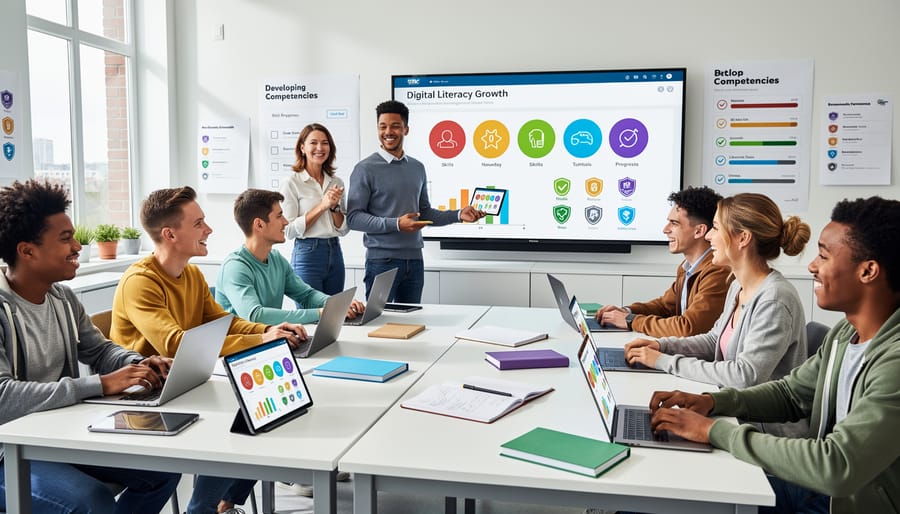
Create simple tracking systems that students can see, like digital badges or progress charts. When learners can visualize their journey from “needs help logging in” to “can troubleshoot their own tech issues,” they build genuine confidence. Consider having students maintain digital portfolios where they reflect on skills they’ve mastered – it’s powerful when they can look back and say, “Wow, I couldn’t do that three months ago!”
Share specific examples of growth during one-on-one check-ins or quick shout-outs. Instead of generic praise, try “I noticed you figured out the formatting tools without asking – that shows real problem-solving!” This helps students understand what digital competence actually looks like in action.
Remember, confidence breeds more confidence. When students recognize they’re becoming digitally capable, they’re more willing to experiment, take risks, and tackle new technologies independently. Your recognition transforms assessment data into motivation fuel.
Here’s the truth: you don’t need to be a tech wizard to assess digital literacy in your classroom. You’re already observing students, noticing how they problem-solve, and adjusting your teaching based on what they need. Assessing digital literacy is simply adding one more lens to what you’re already doing brilliantly every day.
The best part? You can start incredibly small. Choose just one strategy from this article and try it next week. Maybe you’ll pause during a digital activity to ask a few quick questions. Perhaps you’ll add one observation column to your existing notes. Or you might create a simple checklist for students to self-assess during their next online research project. Whatever you choose, it counts.
Remember, every time you acknowledge a student’s creative use of technology or guide them through a digital challenge, you’re both assessing and building their digital literacy. These small moments add up to significant growth. Your students don’t need you to have all the answers about every app or platform. They need you to notice their progress, celebrate their wins, and guide them toward becoming thoughtful, capable digital citizens.
So give yourself permission to learn alongside your students. Start where you are, use what you have, and trust that your intentional attention to digital skills will make a real difference in preparing students for their future. You’ve got this!