

Why Q-Interactive Assessments Transform How You Track Every Student’s Progress
Transform your assessment experience by embracing q-interactive, a digital platform that turns traditional testing into an engaging, tablet-based experience for every student in your classroom. This innovative tool brings standardized assessments into the 21st century while honoring the diverse learning needs of all your students.
Picture this: instead of shuffling through paper test booklets and manually scoring responses, you’re presenting sleek, interactive tasks on a tablet while the platform automatically captures data and tracks progress. Q-interactive makes formal assessment feel less intimidating and more like the game-based activities your students already love.
The platform shines brightest when supporting diverse learners. Built-in accessibility features include adjustable font sizes, high-contrast displays, and audio options that level the playing field for students with different needs. You’re not just administering tests—you’re creating an inclusive assessment environment where every child can demonstrate their true abilities.
What makes q-interactive particularly valuable is how it fits seamlessly into your existing progress monitoring routine. Real-time scoring means you spend less time calculating and more time understanding each student’s growth. The digital format also reduces testing anxiety, as many students feel more comfortable interacting with familiar technology than traditional paper tests.
Ready to modernize your assessment approach while keeping inclusion at the forefront?
What Q-Interactive Assessments Actually Are (And Why They Matter for Your Classroom)
Think of Q-Interactive as bringing your standardized assessments into the 21st century! Instead of juggling paper protocols and keeping students engaged with traditional testing materials, this digital platform transforms how you administer assessments using tablets.
Here’s the simple version: Q-Interactive puts psychological and educational assessments right onto iPad devices. You get one tablet as the examiner, and your student uses another. The platform handles popular assessments like the WISC-V, KTEA-3, and other standardized tests you might already use for progress monitoring and evaluation.
What makes this exciting for your classroom? The interactive elements! Students tap, drag, and interact with assessment items directly on the screen. This digital approach often feels less intimidating than traditional testing formats, especially for students who are already comfortable with technology. The colorful, engaging interface can actually reduce test anxiety and help students show what they truly know.
The connection to inclusive play design is important here. Just like well-designed classroom games consider different learning styles and abilities, Q-Interactive builds in features that support diverse learners. The digital format allows for consistent presentation, clear visuals, and controlled pacing that can benefit students with attention challenges or processing differences.
The platform also automatically scores many items and tracks your administration, cutting down on paperwork and giving you more time to focus on what really matters: understanding each student’s unique strengths and needs. Plus, because everything’s standardized digitally, you get reliable results while making the experience more enjoyable for students.
It’s assessment that actually respects how kids learn today, combining the rigor of standardized testing with the engagement of interactive technology.
How Q-Interactive Makes Assessment More Inclusive for Every Learner
Built-In Accessibility Features That Level the Playing Field
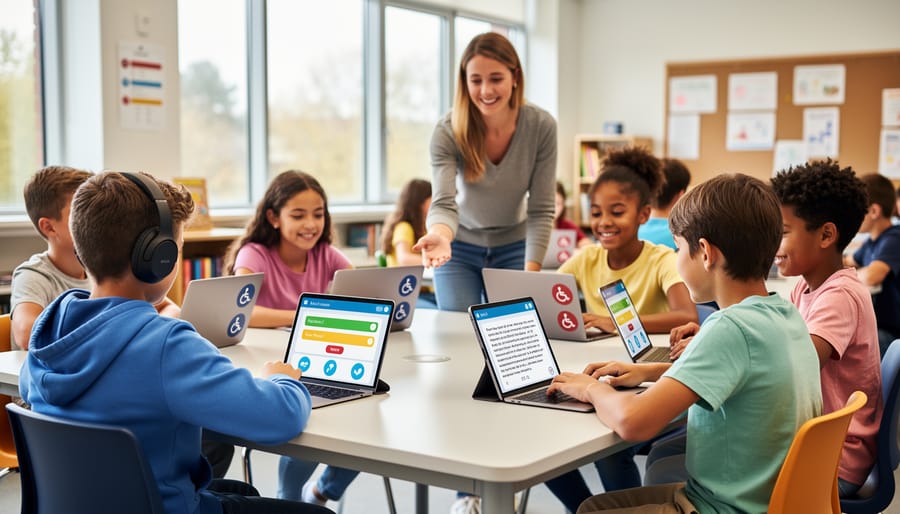
Q-interactive brings some really exciting accessibility features to the table that make assessment more inclusive for all students. Think of it as creating multiple pathways to success, just like the UDL principles encourage us to do in our classrooms.
One of the biggest wins? Students can respond in ways that work best for them. Whether they prefer tapping, swiping, or using voice commands, the platform adapts to their strengths. This flexibility means students who struggle with traditional pencil-and-paper tasks can still show what they truly know.
The visual and auditory options are game-changers too. You can adjust text size, contrast, and colors to support students with visual needs. Need audio support? The platform can read instructions aloud, helping students who benefit from hearing directions rather than just reading them.
Here’s something teachers really love: the familiar digital interface actually helps reduce test anxiety. Most students already feel comfortable with tablets and touchscreens from their everyday lives. This familiarity creates a more relaxed testing environment where students can focus on demonstrating their skills rather than worrying about the format.
Plus, you can customize the pace and presentation for individual students, making sure everyone gets the support they need to succeed. It’s like having a personal assistant built right into the assessment, helping each student put their best foot forward.
Engagement Through Interactive Elements
Q-interactive brings a refreshing twist to traditional testing by incorporating interactive, game-like elements that genuinely capture students’ attention. Instead of feeling like they’re sitting through another formal assessment, students engage with colorful visuals, responsive touchscreen activities, and dynamic content that keeps them interested from start to finish.
This interactive approach works wonders for reducing test anxiety. When assessments feel more like activities than exams, students naturally relax and perform at their true ability level. The platform’s design creates sensory-friendly experiences that accommodate different learning preferences, making testing accessible for everyone in your classroom.
You’ll notice students stay focused longer because the digital format provides immediate visual feedback and varied task types. The engaging interface maintains motivation throughout longer assessment sessions, which means more accurate results for you. Plus, the customizable settings let you adjust the experience to match individual student needs, whether that means adjusting timing, presentation style, or difficulty progression. This flexibility ensures every student can demonstrate their knowledge in the most comfortable, supportive environment possible.
Flexible Pacing for Different Processing Speeds
One of the most empowering features of q-interactive assessments is how they naturally accommodate different processing speeds without drawing attention to individual needs. The digital format gives students the time they need to think through responses without feeling rushed or watched. Unlike traditional paper tests where timing can feel rigid, the tablet interface creates a more relaxed environment where pacing adjustments happen seamlessly.
This flexibility is especially valuable for students who need extra processing time, whether due to learning differences, language considerations, or simply their natural thinking style. The one-on-one digital setup means slower-paced learners don’t feel behind their classmates, while faster processors can move through items at their own speed. Best of all, these adjustments happen organically within the assessment experience itself, helping every student feel comfortable and capable. This inclusive approach reduces test anxiety and provides more accurate insights into what students truly know and can do.
Progress Monitoring Made Simple: Tracking Growth in Real-Time
Instant Scoring and Data That Actually Makes Sense
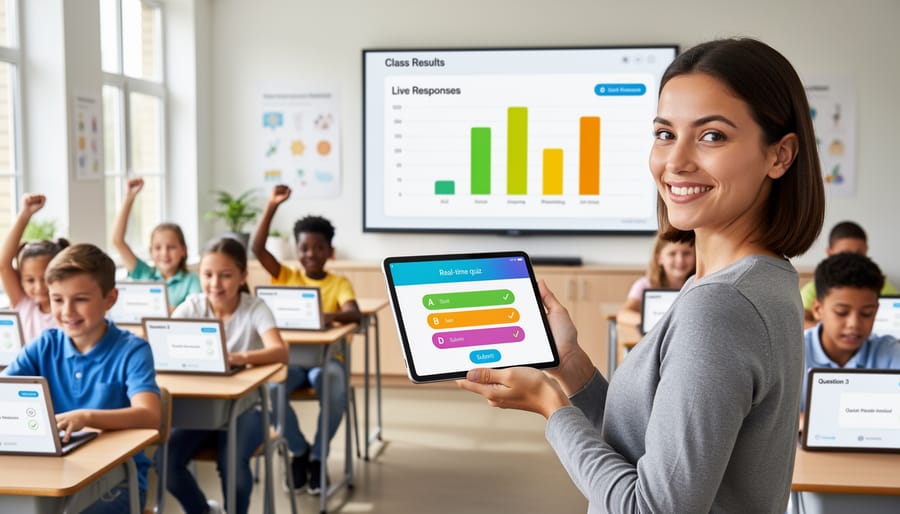
One of the biggest game-changers with q-interactive? You get results right away. No more spending hours manually scoring tests or waiting days to understand how your students performed. The platform automatically scores most assessments as soon as they’re complete, giving you instant access to meaningful data.
What really makes this special is how the information is presented. Instead of drowning you in confusing numbers and charts, q-interactive organizes results in a clear, visual format that highlights exactly what you need to know. You’ll see student strengths, areas needing support, and progress over time, all displayed in ways that make sense for planning your next instructional steps.
The reports are customizable too, so you can focus on the specific information that matters most for each student. Whether you’re sharing results with parents, collaborating with support staff, or adjusting your teaching approach, the data translates directly into action. This immediate feedback loop means you can make informed decisions quickly and keep every learner moving forward without missing a beat.
Spotting Patterns Across Your Whole Class
One of the most exciting features of q-interactive is how it helps you see the bigger picture in your classroom. After students complete their assessments, the platform organizes data in ways that make patterns really easy to spot. You’ll quickly notice which concepts your whole class has mastered and which ones need more attention.
The reporting tools let you group students by different criteria, helping you identify who might benefit from extra support or enrichment activities. Maybe you’ll discover that several students are excelling in visual-spatial tasks but struggling with verbal reasoning. That’s valuable information you can use to adjust your teaching approach and create targeted small groups.
What makes this particularly helpful is how you can compare progress over time. Track how different groups respond to your interventions and celebrate growth together. The visual charts and graphs make data analysis feel less overwhelming and more actionable. Instead of getting lost in numbers, you’ll have clear insights that directly inform your next steps. This bird’s-eye view empowers you to make decisions that truly support every learner in your classroom.
Connecting Assessment Data to Your Daily Lessons
The real magic happens when you transform assessment results into action! Start by reviewing your q-interactive reports within 24 hours while observations are fresh. Look for patterns across students—are several learners struggling with similar skills? That’s your cue to design small group activities targeting those specific needs.
Create a simple data folder for each student where you jot down key findings and next steps. Use color-coding to quickly identify priority areas: green for strengths to celebrate, yellow for skills needing practice, and red for immediate intervention needs.
Here’s a time-saving tip: spend just 10 minutes each week matching assessment data to your upcoming lesson plans. If results show gaps in foundational skills, weave targeted practice into daily routines through games and hands-on activities. Remember, data doesn’t have to be overwhelming—think of it as your personalized roadmap showing exactly where each student needs support. When you connect assessment insights directly to fun, engaging lessons, you’re creating truly customized learning experiences that help every child thrive.
Bringing Play-Based Assessment Into Your Classroom Routine
Pairing Q-Interactive with Classroom Review Games
Once you’ve gathered valuable data from your q-interactive assessments, it’s time to make learning fun! The beauty of formal assessments is that they show you exactly where students need support, and that’s where game-based review activities shine.
Think of q-interactive results as your roadmap for creating targeted, engaging practice opportunities. If assessments reveal that several students struggle with specific math concepts or reading skills, design low-pressure games that address those exact areas. The key difference? Games remove the stress of evaluation and replace it with excitement and repetition in disguise.
Start simple by transforming assessment content into relay races, scavenger hunts, or team challenges. For example, if q-interactive shows vocabulary gaps, create a word matching game where students work collaboratively. When spatial reasoning needs reinforcement, set up hands-on building challenges or digital puzzles that mirror assessment tasks without the formal testing atmosphere.
Customization is your superpower here! Adapt game difficulty based on individual assessment results, creating differentiated stations where students practice at their level. Some might need foundational practice while others tackle extension activities, but everyone’s engaged and growing.
Remember, these games aren’t about evaluation; they’re about building confidence and skills. Students who felt challenged during formal assessments often flourish in game settings where mistakes become learning opportunities rather than scores. By pairing data-driven insights from q-interactive with playful practice, you’re creating a complete learning cycle that honors diverse needs while keeping motivation high. This approach transforms assessment from a one-time event into an ongoing conversation about growth.
Creating a Year-Round Assessment Culture That Feels Like Play
The secret to reducing assessment anxiety? Make evaluation so naturally woven into your classroom that students don’t even realize they’re being assessed! When you embrace play-based assessment principles year-round, testing transforms from a dreaded event into just another engaging learning experience.
Start by incorporating q-interactive’s game-like features during regular instruction, not just during formal testing periods. Use the tablet-based activities as learning stations where students can explore skills in low-pressure moments. This familiarity builds confidence and removes the shock factor when official assessments roll around.
Celebrate small wins throughout the year by framing assessments as opportunities to show growth rather than moments of judgment. Use language like “Let’s see what you’ve learned” instead of “It’s test day.” When students interact with the same engaging digital tools whether they’re practicing or being assessed, the line between learning and evaluation blurs beautifully.
Mix quick check-ins with longer assessments so evaluation becomes a natural rhythm rather than an intimidating interruption. This ongoing approach helps you catch learning gaps early while keeping students comfortable with the assessment process itself.

Getting Started: What You Need to Know Before Your First Assessment
Ready to dive into q-interactive assessments? Great news: getting started is easier than you might think! Let’s walk through what you need to know to feel confident from day one.
First things first, you’ll need two iPads and a reliable internet connection. One device is for you, and one is for your student. The app syncs automatically between devices, creating a smooth, responsive experience. Download the q-interactive app from the App Store, sign in with your credentials, and you’re basically ready to roll. The interface is refreshingly intuitive, designed with busy educators in mind.
Before your first assessment, take 15 minutes to explore the platform yourself. Click around, try out different features, and get comfortable with the navigation. This quick practice run will boost your confidence tremendously when you’re working with students.
When introducing q-interactive to students, keep it light and exciting. Frame it as a special activity where they get to use technology to show what they know. Most students respond enthusiastically to the interactive format, especially reluctant test-takers who feel less intimidated by the digital interface.
Common questions? Here are quick answers: Yes, the app works offline after initial setup, perfect for unreliable connections. No, you don’t need special training beyond basic iPad skills. And yes, students can take breaks just like traditional assessments.
The beauty of q-interactive lies in its customization options. You can adjust settings to accommodate different learning needs, making assessments more accessible and less stressful for everyone involved. Think of it as assessment that adapts to your students, not the other way around.
Remember, your first assessment might feel a bit awkward, and that’s completely normal. By your third or fourth session, you’ll wonder how you ever managed without this tool!
You’ve got this! Embracing digital assessment tools like q-interactive isn’t about adding complexity to your classroom—it’s about making evaluation work smarter for you and your students. These tools transform assessment from something that feels daunting into an experience that’s actually engaging and accessible for everyone.
Think of q-interactive assessments as another way to practice inclusive classroom practice. When assessments feel more like interactive activities than traditional tests, students relax, participate more authentically, and show you what they truly know. The bonus? You get clearer, more actionable data to guide your instruction.
The beauty of digital assessments is their flexibility. You can customize the experience to meet diverse learning needs, monitor progress seamlessly, and spend less time on paperwork and more time connecting with your students. Assessment doesn’t need to be intimidating or one-size-fits-all anymore.
So go ahead and explore these tools with confidence. Your students will benefit from the engaging format, and you’ll appreciate how these platforms simplify progress monitoring while keeping learning fun and inclusive for every child in your classroom.