

Transform Any Lesson Into a Game With This Free Blank Board Template
Transform any lesson into an engaging game experience with a customizable blank board game template—your secret weapon for making review sessions students actually look forward to. Whether you’re drilling multiplication facts, reinforcing vocabulary, or reviewing historical events, these adaptable templates let you create professional-looking games in minutes without design skills or expensive software.
Picture this: Instead of another worksheet, your students are racing around a game board, answering questions to advance their tokens, completely absorbed in learning without realizing they’re practicing essential skills. The beauty of blank templates lies in their flexibility—use the same basic structure for spelling practice on Monday, science review on Wednesday, and fraction work on Friday. Simply print, customize the spaces with your content, and watch engagement soar.
The best part? You control everything. Adjust difficulty levels by changing question complexity, modify rules to match your classroom dynamics, and reuse the same template across subjects and grade levels. No need to search for pre-made games that almost fit your needs—create exactly what your students need, when they need it, with minimal prep time and maximum impact.
What Makes a Blank Board Game Template So Powerful?
Think of a blank board game template as your classroom’s Swiss Army knife—it’s one simple resource that transforms into countless learning adventures! Unlike pre-made games locked into specific topics, a blank template puts you in the driver’s seat, giving you complete creative control.
Here’s what makes these templates so powerful: they’re endlessly reusable. That single template you print today can become a vocabulary review game on Monday, a math facts challenge on Wednesday, and a science quiz game on Friday. No need to hunt down different games for every subject or unit—you’ve got one flexible tool that adapts to whatever you’re teaching.
The beauty lies in customization. You know your students better than anyone—their interests, learning levels, and what motivates them. With a blank template, you can tailor content perfectly to match where they are right now. Studying ancient civilizations? Create a game using vocabulary they’ve been learning. Working on multiplication? Add problems that target the exact facts they need to practice.
Plus, blank templates save you precious planning time. Instead of designing games from scratch or searching endlessly online, you’re starting with a ready-made structure. Just add your content, and you’re done! It’s like having a recipe where you simply swap ingredients based on what your classroom needs. This flexibility means more engaging lessons with less work—exactly what every teacher dreams about!

Inside Your Customizable Blank Board Game Template
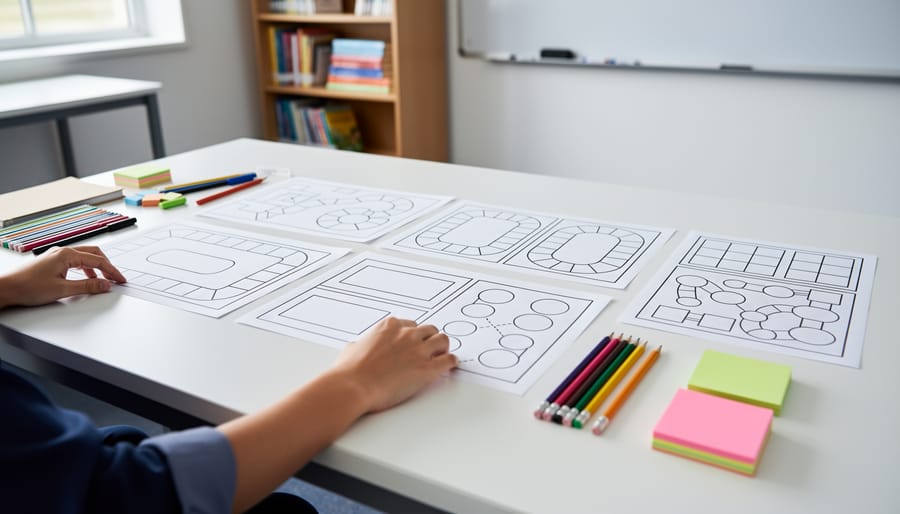
Game Board Layout Options
Your blank board game template comes with flexibility built right in! Choose from several popular layouts that work perfectly for different learning activities. The classic linear path design features connected spaces from start to finish—ideal for sequential learning like timeline events, story sequences, or step-by-step math problems. For more strategic gameplay, try the circular track layout where students loop around the board, reinforcing concepts through repetition.
Need something more adventurous? Branch-path designs let students make choices and explore different routes, perfect for decision-making scenarios or “choose your own adventure” style learning. Grid-based layouts work wonderfully for vocabulary games, matching activities, or coordinate practice. The beauty is that you can easily modify any layout by adding or removing spaces, changing directions, or combining elements from different styles. Simply print your chosen template and customize the spaces with your lesson content using markers, stickers, or printed labels. Each configuration adapts seamlessly to any subject or grade level you teach!
Built-In Features That Save You Time
Say goodbye to creating everything from scratch! These templates come packed with features that make game setup a breeze. Many include built-in scoreboards that automatically track points, saving you from manual calculations during fast-paced review sessions. Digital timers keep games moving at the perfect pace, adding excitement without you watching the clock. Sound effects bring energy to correct answers and keep students motivated throughout play.
Even better, some templates integrate interactive elements like spinner wheels or a randomizer wheel for turn selection, ensuring fairness while adding an element of surprise. These ready-to-use features mean you can focus on teaching content rather than managing game mechanics. Simply customize the questions or content spaces, and you’re ready to play within minutes. The best part? Students stay engaged while you maintain smooth classroom flow without technical headaches.
Five Ways to Use Your Blank Template This Week
Vocabulary Review Race
Ready to energize your language lessons? Create a vocabulary review game by filling each space with target words or their definitions. Students roll the dice and must use the word in a sentence, provide a synonym, or translate it correctly to advance. This works beautifully for spelling practice, foreign language vocabulary building, or literary terms review. Add challenge cards for bonus points when students land on special spaces. You can easily adjust difficulty by changing the vocabulary level, making one template work for multiple units throughout the year. It’s a fun way to turn test prep into an engaging competition that students actually look forward to!
Math Facts Challenge
Turn math practice into an exciting competition! Add equations to each game space—simple addition for younger students or fractions and algebra for older learners. Players solve the problem before moving forward, making every turn a learning opportunity. Customize difficulty by mixing easier warm-up questions with challenging brain-teasers. You can even color-code spaces by operation type or skill level. This hands-on approach helps students build confidence and speed with math facts while having fun. Watch engagement soar as kids forget they’re actually practicing!
History Timeline Game
Bring history to life by turning your blank template into an engaging timeline game! Students move along the path while placing historical events in chronological order. You can customize spaces with different eras, important dates, or themed categories like “Ancient Civilizations” or “World Wars.” Add challenge cards that ask players to sequence three events correctly before advancing. This works wonderfully for reinforcing cause-and-effect relationships and helping students visualize how historical events connect. The hands-on nature makes memorizing dates and sequences much more enjoyable than traditional worksheets, and you can easily adjust difficulty levels for different grades.
Science Concept Trivia
Turn your blank board game into an exciting STEM review session! Create question spaces where students answer science, math, or technology trivia to advance. Customize the difficulty level by color-coding spaces—blue for easy, green for medium, red for challenging. Add fun challenge squares like “Explain your answer to earn a bonus move” or “Help a teammate for double points.” This setup works brilliantly for test prep, vocabulary review, or reinforcing key concepts. Students stay engaged because they’re learning while playing, and you can easily swap out questions to match your current unit.
Team-Building Icebreaker
Kick off the school year or welcome new groups with a fun twist! Transform your blank board game into a getting-to-know-you adventure where students answer personal questions as they move around the board. Add prompts like “Share your favorite hobby” or “What’s your dream vacation?” in each space. Students roll dice, land on spaces, and share their answers with classmates. This playful approach helps break down social barriers and builds classroom community from day one. Customize questions to match your students’ ages and interests, making everyone feel included and excited to participate together.
How to Customize Your Template in Minutes
Adding Your Content
Now comes the fun part—making this template your own! Simply decide what learning content you want to reinforce, then add your questions, prompts, or challenges to each space on the board. You can handwrite directly onto printed templates for quick prep, or type your content into editable digital versions for a polished look you can reuse year after year.
Think about varying your prompts to keep students engaged. Mix straightforward review questions with creative challenges like “Act out this vocabulary word” or “Explain this concept to your neighbor.” For younger learners, consider using picture cues alongside text. Don’t forget to customize any special spaces too—turn them into bonus point opportunities, skip-ahead rewards, or mini-challenge zones that add excitement to gameplay.
Pro tip: Laminate your completed boards and use dry-erase markers so you can easily update content as your curriculum progresses. This simple trick transforms one template into an endless supply of learning games throughout the school year!
Personalizing Colors and Themes
Make your game board truly yours by choosing colors that connect with what you’re teaching! For science units, try blues and greens for ocean themes or warm oranges and reds for solar system topics. Math games pop with bright primary colors that help students distinguish different problem types or operations.
Don’t have fancy design software? No problem! Colored markers, crayons, or even construction paper cutouts work beautifully. Many teachers print their templates and let students add the color as a fun classroom activity before playing.
Match your game spaces to seasonal themes too. Fall harvest colors, winter snowflakes, or spring flowers keep things fresh throughout the year. You can even tie colors to your classroom’s existing decor or school colors for that extra sense of community.
The best part? Once you create a color scheme you love, save it as your go-to template. You’ll have a consistent look across different subjects while saving precious prep time for future games.
Setting Up Game Rules
The beauty of blank board game templates is that you can adjust the rules to fit any learning goal! For younger students, keep it simple with straightforward paths and basic point systems—like earning one point per correct answer. Older learners can handle more complexity, so add challenge cards, bonus squares, or team-based competition elements.
Think about your objective: Is this for review, skill practice, or team building? Match your point system accordingly. Maybe students earn points by solving problems, answering questions, or completing tasks related to your lesson. You can even incorporate movement or creative responses as game actions!
Don’t forget to design inclusive classroom games by offering multiple ways to earn points. Some students might answer verbally while others write responses or draw pictures. The key is flexibility—your template should work for everyone in your classroom, creating an engaging experience that celebrates different learning styles and abilities.
Tips for Maximum Student Engagement
Getting the most out of your board game template starts with smart planning! For group size, aim for 2-4 students per game board. This keeps everyone actively participating without too much downtime between turns. If you have a larger class, run multiple games simultaneously—it actually creates wonderful energy as groups play side by side.
Time management is crucial for success. Start with shorter 15-20 minute game sessions until students understand the rules and flow. You can always extend play in future lessons. Set a timer and give a five-minute warning so students know when to wrap up. This prevents the “just one more turn” syndrome that can derail your schedule!
Keep all students engaged by assigning roles beyond just players. Designate a scorekeeper, a rule checker, or a question reader. Rotate these roles so everyone gets different responsibilities. This approach supports making games work for all learners by giving various ways to participate.
Use fair selection methods to determine who goes first and form balanced groups. Mix ability levels strategically so stronger students can support classmates without dominating gameplay.
Finally, build excitement! Play upbeat background music, offer simple rewards like stickers or bonus points, and celebrate wins enthusiastically. When students see you’re excited about the game, their engagement naturally follows. Remember, the goal is making learning feel like play—and these templates make that incredibly easy to achieve!
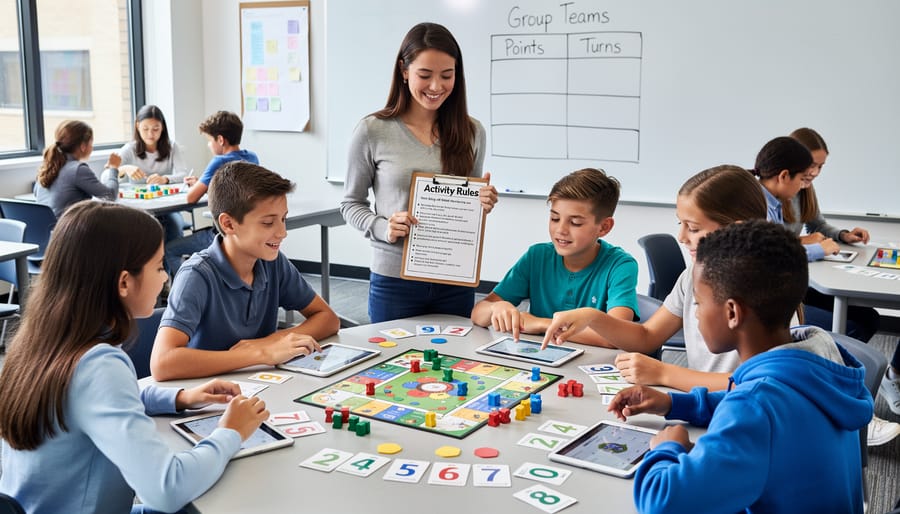
Getting Started With Your Blank Board Game Template
Ready to bring this amazing teaching tool into your classroom? Getting started is super simple! First, download your blank board game template – most are available as PDF or editable files that work with common programs like PowerPoint, Google Slides, or even Word. Once you’ve saved it to your computer or cloud storage, you’re ready to roll.
Before you dive into customizing, gather your learning materials. Think about which subject or skill you want to focus on, and have your questions, vocabulary words, or math problems ready to plug in. This prep work makes the customization process much smoother and faster.
Your first step is opening the template and exploring what’s included. You’ll typically find game spaces, card templates, and sometimes even printable game pieces. Start by adding your content to the game board spaces – type directly into editable versions or print and handwrite for a personal touch. Don’t worry about making it perfect right away; the beauty of these templates is that you can adjust and reuse them as many times as you need. The goal is creating something your students will love while reinforcing their learning!
Ready to revolutionize your review sessions? This customizable blank board game template is your ticket to turning ordinary classroom time into extraordinary learning adventures. The beauty lies in its flexibility—whether you’re teaching multiplication facts, vocabulary words, or historical events, you can adapt this one template to fit any subject and any grade level. No need to search for multiple resources or spend hours creating games from scratch. Simply print, customize with your content, and watch your students light up with excitement. The best part? You can use it again and again throughout the year, switching out questions and themes as you move through your curriculum. So grab that template, add your creative touch, and get ready to transform those mundane review sessions into engaging experiences your students will actually ask for. Your classroom is about to become the most exciting place to learn!