

Create Perfect Review Questions in Seconds with a Blackboard Question Generator
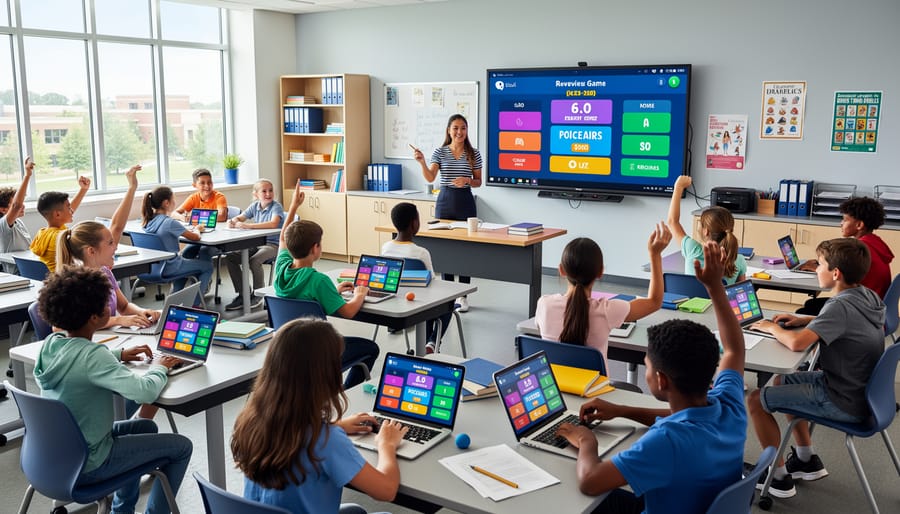
Transform your review games into engaging learning experiences by projecting randomly generated questions onto your classroom blackboard or whiteboard. A blackboard question generator eliminates the tedious task of manually writing review questions while keeping students on their toes with unpredictable selections.
Picture this: you’ve loaded your vocabulary words, math problems, or history facts into a simple digital tool, and with one click, questions appear on screen for the whole class to see. No more scrambling to think of fair questions or worrying about repeating the same ones. Your students stay focused because they never know what’s coming next, and you maintain complete control over the content and difficulty level.
The best part? Setup takes just minutes. Create your question bank once, save it, and reuse it across multiple class periods or adapt it as your curriculum evolves. Whether you’re running a quiz bowl, playing team Jeopardy, or conducting quick formative assessments, this tool streamlines your preparation while maximizing student engagement. You’ll spend less time on logistics and more time celebrating those lightbulb moments when concepts finally click for your learners.
What Is a Blackboard Question Generator?
A blackboard question generator is an innovative digital tool that brings the familiar classroom blackboard experience into the world of interactive learning games. Think of it as your personal question-creating assistant that transforms the traditional way you write review questions on the board into a dynamic, reusable format perfect for game-based learning activities.
Here’s how it works: instead of manually writing out questions each time you want to play a review game, the generator allows you to input your questions once and display them instantly in a visually appealing, blackboard-style format. The tool randomly selects questions from your custom list, creating an element of surprise and engagement that keeps students on their toes.
What makes this different from creating questions the old-fashioned way? First, it saves you incredible amounts of time. Rather than erasing and rewriting questions during game time, you simply click to reveal the next one. Second, it’s endlessly reusable—create a question bank once and use it multiple times throughout the year. Third, the visual presentation mimics that classic blackboard aesthetic students recognize while adding modern interactive features that boost engagement.
The beauty of a blackboard question generator lies in its customization options. You control everything: the questions, the difficulty level, the subject matter, and even how they’re displayed. Whether you’re reviewing multiplication tables, vocabulary words, or historical dates, the generator adapts to your needs.
Most importantly, it transforms routine review sessions into exciting game experiences. Students respond more enthusiastically to questions appearing on a digital blackboard than traditional worksheets, making learning feel less like work and more like play.
Why Your Classroom Games Need a Question Bank System
Save Hours of Prep Time Every Week
Imagine cutting your review game prep time from 45 minutes down to just 5 minutes. That’s the power of using a blackboard question generator with pre-built question banks! Instead of typing out 20-30 questions every single time you want to run a classroom game, you simply load your saved questions and start playing.
Here’s what this looks like in real terms: Creating questions from scratch typically takes 2-3 minutes per question when you factor in thinking, typing, and double-checking for accuracy. With pre-built banks, you’re reusing quality questions you’ve already created or imported. One middle school teacher shared that she now spends Sunday afternoon building question sets for the entire week, then reuses and tweaks them throughout the semester.
The best part? You can create different versions for various skill levels or topics, then mix and match as needed. Build it once, use it all year. That’s hours back in your week for what really matters—connecting with your students.
Keep Every Student Engaged
Here’s the secret to keeping every student on their toes: randomized question generation! When your blackboard question generator shuffles through questions unpredictably, students can’t tune out or rely on patterns. Everyone stays alert because they never know which question is coming next.
This randomization creates natural fairness in your review games. No student gets easier or harder questions based on where they sit or when their turn comes up. Each team faces a balanced mix of challenges, which keeps competition friendly and motivating. Plus, it eliminates that awkward moment when students argue about question difficulty!
The excitement level stays high from start to finish. Unlike traditional review methods where energy fizzles out, random selection maintains momentum. Students stay engaged because anticipation builds with each reveal. Will it be a vocabulary question? A math problem? They’ll need to stay sharp for anything!
Best of all, you can customize your question pool to match exactly what your class needs to review, ensuring every randomly selected question reinforces your learning objectives perfectly.
How to Set Up Your First Blackboard Question Generator
Building Your Question Bank
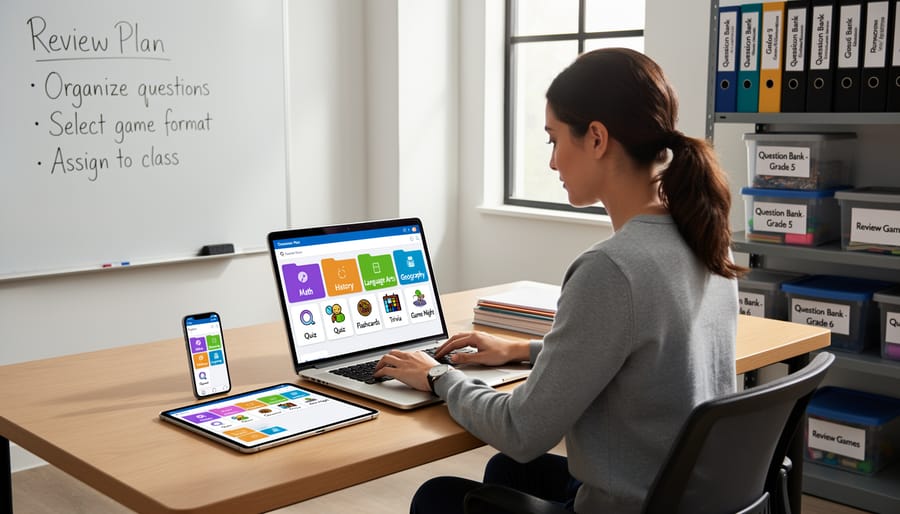
Creating an organized question bank makes your review games run smoothly and saves you tons of prep time! Start by grouping your questions into clear topic folders. For math, you might have separate sets for fractions, geometry, and algebra. Science teachers can organize by units like ecosystems, matter, or the solar system.
Next, color-code or label questions by difficulty level. Try using green for easier warm-up questions, yellow for grade-level questions, and red for challenge problems. This way, you can quickly adjust the game difficulty based on your class’s energy and confidence level.
Mix up your question types to keep things exciting! Include multiple choice for quick recall, true/false for rapid-fire rounds, and open-ended questions for deeper thinking. For example, a history teacher might ask “What year did World War II end?” (multiple choice), “The Declaration of Independence was signed in 1776” (true/false), and “Why was the Louisiana Purchase important?” (open-ended).
Here’s a pro tip: create themed question sets for different seasons or events. A language arts teacher might build a Halloween-themed vocabulary set or a poetry collection for National Poetry Month. Keep your question bank digital so you can easily search, edit, and reuse your favorites year after year. Many teachers find that spending just 15 minutes weekly adding new questions builds an impressive collection that makes future planning a breeze!
Connecting Questions to Your Game Templates
Ready to bring your question bank to life? Connecting your questions to PowerPoint game templates is easier than you think! Most templates with built-in generators include a dedicated questions tab or slide where you simply paste your content.
Start by copying your questions and answers from your Blackboard spreadsheet. Then, open your chosen game template and locate the question input area—it’s usually clearly labeled. Paste your questions into the designated columns, making sure questions and answers align properly. The generator will automatically pull from this bank during gameplay!
Here’s a time-saving tip: keep your question format consistent. Use the same structure for all entries (like “Question | Answer A | Answer B | Answer C | Correct Answer”) so the template reads everything correctly. Most templates let you add 20-50 questions at once, giving you plenty of variety for multiple game rounds.
Test your connection by running through a few sample questions before class. This quick check ensures everything displays properly and your students get a smooth, engaging experience. Once it’s set up, you can reuse the same template with different question banks all year long!
Customizing the Display and Format
Make your question generator truly yours by playing with the visual elements! Most tools let you customize fonts, colors, and layouts to match your classroom vibe and subject area. Teaching elementary math? Go for bright, cheerful colors and larger fonts that are easy to read from across the room. High school literature? Try sophisticated color schemes with elegant typography.
Start by exploring your tool’s design settings—usually found in a settings menu or customization panel. You can typically adjust background colors, text colors, and even add themed borders or backgrounds. Many teachers love matching their displays to seasonal themes or specific units they’re teaching.
The best part? Once you create a style you love, most generators let you save it as a template for future use. This means you’ll save time while keeping everything looking polished and professional. Don’t be afraid to experiment until you find what works best for your students and teaching style. After all, a visually appealing game keeps students more engaged and excited to participate!
Best Practices for Writing Game-Ready Questions
Keep Questions Clear and Concise
When you’re running a fast-paced classroom game, every second counts! Long, winding questions can slow down the energy and confuse students before they even get to the answer. That’s why keeping your questions clear and concise is absolutely essential for maintaining momentum and engagement.
Think about it from your students’ perspective. During an exciting game of quiz bowl or Jeopardy-style review, they want to buzz in quickly and show what they know. If they have to wade through extra words and complicated phrasing, they’ll lose focus and the game loses its spark.
Here’s your quick test: read your question out loud. If you find yourself running out of breath or stumbling over unnecessary phrases, it’s time to trim. Remove filler words like “basically,” “essentially,” or “in other words.” Cut redundant information that doesn’t help students identify the correct answer.
For example, instead of “Can you tell me what the name of the process is when water changes from a liquid state into a gas state?” try “What is the process when water becomes gas?” Same question, half the words, twice the impact! Your students will appreciate the clarity, and your games will flow beautifully.
Balance Difficulty Levels
The secret to a great classroom review game? Mix it up! When you’re setting up your blackboard question generator, aim for a balanced blend of difficulty levels that gives everyone a chance to shine.
Start with a solid foundation of easier warm-up questions—think recall and basic comprehension. These build confidence and get students excited to participate right from the start. Everyone loves that feeling of knowing an answer, and it sets a positive tone for the entire game.
Next, sprinkle in medium-difficulty questions that require a bit more thinking. These keep the momentum going and challenge students to apply what they’ve learned. This middle tier is where most of your questions should live—it’s the sweet spot that keep all students participating without feeling overwhelmed or bored.
Finally, add some challenging questions for those moments when you want to really stretch their thinking. These tougher questions create exciting suspense and give your high-achievers something to reach for.
A good rule of thumb? Try a 30-50-20 split: 30% easy, 50% medium, and 20% challenging. But here’s the beauty of customization—you know your class best! Adjust these percentages based on your students’ needs. Teaching a group that needs extra support? Increase those easier questions. Have a class of quick learners? Bump up the challenge level.
Remember, variety keeps engagement high and ensures every student walks away feeling successful.
Creative Ways to Use Your Question Generator Across Subjects
Ready to see your question generator shine across your curriculum? Let’s explore some fun ways teachers are bringing this tool to life in different subjects!
In math class, transform problem-solving into an exciting challenge. Create questions like “What is 45 × 12?” or “Solve for x: 2x + 7 = 15” and organize them by difficulty level. Try a relay race format where teams send one student at a time to answer questions on the board. Each correct answer earns points and unlocks the next problem. Students love the competitive energy, and you’ll love watching them tackle equations with enthusiasm!
Science teachers are getting creative too. Generate questions about the water cycle, photosynthesis, or Newton’s laws. Mix multiple-choice with true-false questions to keep things interesting. One popular format is “Science Showdown” where students work in pairs to answer questions about current units. Add vocabulary terms, lab safety rules, or even fun facts about famous scientists to keep everyone engaged.
Language arts becomes interactive when you load comprehension questions about your current novel or grammar practice questions. Try “Story Detectives” where students answer questions about character development, plot points, or literary devices. You can also create vocabulary matching games or punctuation challenges that make editing practice feel like play.
Social studies transforms with timeline questions, geography challenges, and historical figure identification. Create a “Time Travel Tournament” where students answer questions from different historical periods. Include map questions, primary source analysis, or current events discussions.
The best part? You can customize difficulty levels for different learners and save question sets for year after year. Mix and match formats like Jeopardy-style categories, rapid-fire rounds, or team tournaments. Your question generator adapts to whatever subject or game format matches your classroom energy that day!

You don’t need to revolutionize your entire teaching approach overnight. Start with just one question bank for your next review game and watch what happens. You’ll quickly discover that creating engaging questions becomes second nature, and your students will be begging for more game days.
The real magic of a blackboard question generator isn’t just about saving time, though that’s a fantastic bonus. It’s about transforming those chaotic review sessions into moments your students genuinely look forward to. No more scrambling to create fair questions on the spot or worrying whether you’re covering all the important material. Everything you need is right there, organized and ready to go.
Think about your next classroom game. Whether it’s a quiz bowl, team competition, or fun Friday review, you already have the content knowledge. Now you just need a simple system to organize it. Give the question generator a try and see how it changes your classroom energy. Your future self will thank you when review time becomes the highlight of everyone’s week instead of a last-minute stress session.