
Your Game Data Isn’t Working Because Your Assessment Design Is Broken
Design your game assessments backward by starting with the specific learning goal you need to measure, then craft questions that reveal student understanding of that exact concept. Map each game question to a clear standard or skill so you can quickly identify gaps after gameplay—this transforms entertainment into actionable data you’ll actually use on Monday morning.
Build your review game with intentional question types that show you how students think, not just what they memorize. Include scenarios requiring application, questions with common misconceptions as answer choices, and problems asking students to explain their reasoning. This approach gives you insight into where confusion exists, making your next lesson laser-focused on real needs.
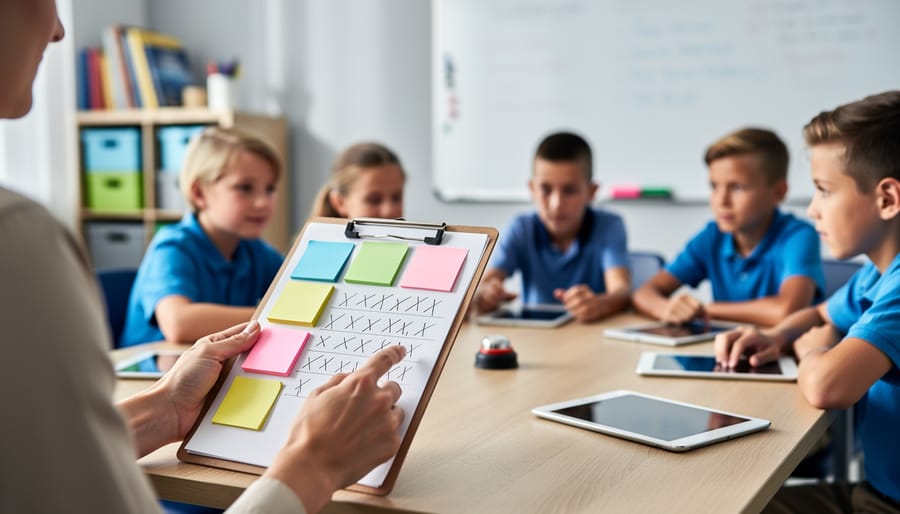
Create a simple tracking system during gameplay that captures which questions students miss most frequently. Use a tally sheet, digital spreadsheet, or even sticky notes to record patterns as you facilitate the game. When three or more students struggle with the same question, you’ve identified tomorrow’s mini-lesson topic without grading a single paper.
Customize your game template to include reflection moments where students explain their answer choices to partners before submitting responses. These quick conversations reveal misconceptions in real-time and give you formative feedback you can address immediately. The best assessment data comes from listening to student thinking, not just recording right and wrong answers.
Why Most Game Assessments Miss the Mark
You know that exciting moment when your class finishes a review game? Students are buzzing, high-fives are flying, and the winning team is celebrating their victory. But here’s the tricky part: while you know who scored the most points, do you actually know what your students learned?
This is where most game-based reviews fall short. Traditional game scoring focuses on entertainment metrics like total points, speed bonuses, and win/loss records. These are fantastic for keeping students engaged, but they don’t tell you much about learning. A student might win by getting lucky on easier questions while avoiding challenging concepts entirely. Another might lose despite demonstrating solid understanding of your target standards.
The disconnect becomes even clearer when you try using that game data for instructional planning. Knowing Team Red beat Team Blue 450 to 380 doesn’t help you identify which vocabulary terms need reteaching or which math concepts are still causing confusion. Without purposeful design, your game assessments lying about student mastery becomes a real problem.
Entertainment-focused metrics also create another issue: they reward participation and luck rather than understanding. A chatty student might dominate team discussions without actually knowing the content, while a quieter learner’s accurate thinking gets lost in the noise.
The good news? This doesn’t mean ditching review games. It simply means designing them differently from the start. By shifting your focus from game scores to learning evidence, you can maintain all that student excitement while actually gathering data that informs your teaching decisions. The key is backward-designing your game assessments with clear learning goals in mind, then customizing the experience to capture the insights you truly need.
The Three Questions Your Assessment Design Must Answer
What Students Actually Know (Not Just What They Guessed Right)
The real magic happens when you design games that show you what students truly understand, not just who got lucky or rode their teammate’s coattails. Here’s the secret: individual accountability built right into your game structure.
Start by requiring every student to record their own answer before the team discusses. Use mini whiteboards, index cards, or even a quick Google Form. This gives you snapshot data on each learner before collaboration happens. You’ll quickly spot common assessment design mistakes like questions that are too easy to guess or concepts everyone’s struggling with.
Mix up your question types too. Include some that require explanation or justification, not just multiple choice. Ask students to sketch a diagram, write a sentence using vocabulary in context, or solve a problem showing their work. These reveal thinking patterns that simple right-or-wrong answers hide.
Want to level up? Add reflection moments where students rate their confidence on each answer. This metacognitive layer helps you distinguish between solid knowledge and shaky ground. Plus, it empowers students to advocate for their own learning needs.
Where the Learning Breaks Down
The real magic happens when you design questions that reveal exactly where students get stuck. Instead of just marking answers right or wrong, think about what mistakes tell you. For example, if students consistently miss questions about fractions, is it the concept of equivalent fractions or multiplying denominators that’s tripping them up?
Build strategic checkpoints throughout your game that target specific skills. Place similar question types at different points to see if understanding improves with practice or stays shaky. You might discover that students nail vocabulary in isolation but struggle when applying those same terms in context.
Consider tracking patterns by student or by question type. When three students all choose the same wrong answer, that’s not random – it’s a misconception you need to address. Design your game to flag these trends so you’re not hunting through data afterward. The goal is gathering actionable intel that shapes tomorrow’s lesson, not just generating a grade for today.
Your Next Teaching Move
Ready to transform your game-based assessments into powerful teaching tools? Start small with one game that addresses a specific learning target. As students play, track the questions they miss most frequently. This simple pattern reveals exactly what needs reteaching tomorrow.
Create a quick reference sheet that connects each game question to your instructional next steps. For example, if students struggle with question 5 about fractions, you’ll plan a small-group intervention on equivalent fractions. This direct link between data and action makes assessment meaningful.
Don’t wait until the end of the unit to collect this information. Build in regular check-ins through quick games that take just 10 minutes. The faster you gather data, the sooner you can adjust your teaching while concepts are still fresh in students’ minds. Remember, the best assessment is one that immediately shapes how you teach tomorrow.
Design Your Game Assessment Backwards
Start With Your Feedback Goal
Before you dive into creating your next review game, pause and ask yourself this game-changing question: “What do I need to know to adjust my teaching tomorrow?”
This simple question shifts everything. Instead of creating assessments that just keep students busy, you’ll design games that give you real, actionable insights.
Think specifically here. Rather than a vague goal like “see if students understand fractions,” get precise. Do you need to know which students confuse equivalent fractions? Whether they can compare fractions with unlike denominators? If they’re ready to move on to multiplication?
Your feedback goal drives every decision you’ll make next, from which question types to include to how you’ll track responses during gameplay.
Here’s your quick check: If the data you collect wouldn’t actually change what you teach the next day, your goal needs sharpening. The sweet spot is identifying one or two specific skills or misconceptions you can address immediately.
Remember, you’re not trying to assess everything at once. Focus on what matters most for your students right now, and design your game assessment around that single, clear target.
Match Game Mechanics to Learning Evidence
The magic happens when your game mechanics actually show you what students know! Think of it this way: if you need to check conceptual understanding, multiple-choice questions with strategic distractors work wonderfully. But if you’re assessing application skills, open-ended response rounds give you richer data.
Here’s your quick-match guide: Use point values to emphasize priority standards (higher points for tougher concepts you really need to measure). Add bonus rounds for skills that require deeper thinking. Include team collaboration elements when you want to observe communication and problem-solving strategies.
The best part? You can tweak these elements on the fly! Notice students struggling with a particular question type? Switch it up mid-game. Keep scoring simple enough that you can track patterns quickly. Remember, you’re gathering evidence of learning, not just entertaining kids.
Pro tip: Build in a mix of individual and team questions so you can identify both personal mastery and collaborative understanding. This dual approach gives you a complete picture of where each student stands while keeping the energy high and engagement strong.
Build in Quick Data Collection Points
The secret to successful game-based assessment is making data collection feel invisible. When students are caught up in the excitement of competition, they won’t even notice you’re gathering valuable information about their learning.
Start by designing your answer slides to automatically track responses. Create a simple tally system right on your game board where you can quickly mark correct and incorrect answers by team or individual. Color-coded dots or checkmarks work beautifully and take just seconds to add.
Consider using a participation tracker on a clipboard or tablet nearby. Jot down quick notes about who’s answering, common misconceptions you’re hearing, or topics that generate confusion. These observations are gold for planning your next lesson.
Build in strategic pause points where you can screenshot the scoreboard or quickly photograph student work. These visual records capture learning in action without stopping the game’s momentum.
For digital games, use the notes section in PowerPoint to record patterns you notice during gameplay. Did everyone struggle with question seven? Note it right there for later review.
The key is keeping your data collection methods simple and unobtrusive. When the game flows naturally and you’re capturing meaningful information effortlessly, everyone wins.
Make Your Data Immediately Usable
Simple Tracking That Works
You don’t need fancy tech to capture valuable information during classroom games! Start with the simplest option that fits your style. A quick clipboard checklist works wonders—just jot down checkmarks next to student names as they answer correctly, or note common misconceptions you hear. Sticky notes are another teacher favorite: write observations during play and stick them in student folders afterward.
Ready for something more streamlined? Try a basic spreadsheet on your laptop or tablet. Create columns for student names and question numbers, then mark correct responses with a quick keystroke. This gives you sortable data you can review later.
For those who love efficiency, explore data analytics tools built right into digital game templates. These automatically track responses and generate reports without interrupting gameplay. The key is choosing a method you’ll actually use consistently. Pick something that feels natural in your classroom flow—you can always level up your tracking system as you get comfortable with the basics.

From Numbers to Next Steps
So you’ve got your game data—now what? The magic happens when you spot patterns and turn them into real classroom action. Start by looking for questions where more than half your students struggled. These are your teaching goldmines! They signal concepts that need reteaching or a different approach.
Group similar mistakes together. Did everyone miss the same type of problem? That’s your cue to revisit that skill with fresh examples or hands-on practice. Celebrate the wins too! Questions most students aced show what’s sticking, so you can build on that foundation.
Here’s where it gets exciting: use your findings to customize future games. Swap out mastered questions for new challenges, or create targeted mini-games focusing on trouble spots. You might discover that certain game formats work better for specific content—lean into what engages your students most.
The best part? This doesn’t require fancy analytics. A quick scan of results combined with your teacher intuition is incredibly powerful. Set aside just ten minutes after each game to jot down one or two concrete next steps. Maybe it’s a small group intervention, a quick review video, or adjusting tomorrow’s lesson. Small adjustments based on real data lead to big learning gains.
Customize Your PowerPoint Games for Better Assessment
Ready to transform your existing game templates into powerful learning tools? The good news is you don’t need to start from scratch. Small, strategic tweaks to your favorite PowerPoint games can dramatically improve the quality of feedback you receive.
Start by examining your question selection. Instead of randomly choosing review questions, align each one to a specific learning objective. Add a hidden note or tag on each slide indicating which standard or skill it addresses. This simple addition helps you track exactly where students are thriving and where they need more support.
Next, adjust your answer choices to be diagnostic. When creating multiple-choice options, design incorrect answers that reveal common misconceptions. For example, if students consistently choose option B, you’ll know they’re struggling with a particular concept rather than just guessing randomly.
Consider adding difficulty levels to your game slides. Color-code questions by complexity or group them into rounds that increase in challenge. This allows you to see not just what students know, but how deeply they understand the material.
Don’t forget about timing. Add a consistent time limit to questions and track which ones take longer. Questions that eat up more time often indicate areas where students lack automaticity or confidence, giving you valuable insight for future lessons.
Finally, create a simple tracking sheet alongside your game. Jot down team responses or use tally marks for correct answers by category. This low-tech addition takes seconds but provides concrete data you can reference when planning your next instructional moves. These modifications work with any template you already love, making assessment more meaningful without extra work.
Here’s the exciting truth: good assessment design doesn’t mean sacrificing the fun. It actually makes the fun matter more because every laugh, every competitive moment, and every victory becomes a genuine learning win for your students.
Remember, it all comes down to backward design. Start with what you need to know about your students’ understanding, then build your game questions to reveal exactly that information. When you collect data that actually shows you where students are struggling and where they’re thriving, those colorful game boards and spinning wheels transform from pure entertainment into powerful teaching tools.
Ready to get started? You don’t need to overhaul everything at once. Pick just one game you’re planning for next week and try one small improvement. Maybe it’s adding those higher-order thinking questions we talked about, or perhaps it’s customizing your answer choices to reveal common misconceptions. That single change will give you better feedback than a dozen generic review games.
Your students will still have a blast, you’ll still hear the same excited energy in your classroom, but now you’ll walk away with insights that actually shape tomorrow’s lesson. That’s assessment design that works.